29 Biggest Obstacles to Starting a Successful Blog or Website

I recently revamped my email series.  You know, the autoresponder series that people get when they sign up to my email list.
This new email series is an 11 part “mini-course” on how to build a profitable site from beginning to end. Perrin was very instrumental in helping me get this series off the ground.  It’s not easy to write 20,000 words and divide it into bit-sized emails that people will find interesting.
As part of this “revamping” process, I tried something new.  I asked for people to respond to me directly.  That’s right, in the very first email I asked people about their biggest obstacles.
As a result, I got some VERY interesting responses.  Some were expected such as, “I’m having trouble ranking in Google”; while others were less expected such as, “I can’t convince my wife that this online business is viable thing”.
I also have to admit that I was TOTALLY overwhelmed by the sheer number of responses that I got…very quickly.  Within less than a week I had over 300 responses to that first email.  With everything else that I have going on in my business, I was not able to respond to all those emails (so I apologize if I didn’t respond to you!).
As a result, I’ve removed this “poll” from my email series because it quite frankly would take a ton of time to respond to everyone on an ongoing basis.  I guess it’s a good problem to have…too many email subscribers.
However, I think the findings I gathered from these 300+ email responses is not only highly valuable to me, but can also be highly valuable to you as you seek to get started building a niche site, blog, or other online business.
Because of this, I meticulously went through each email and documented what everyone’s biggest roadblocks were.  You can see all the data below in a nice chart (I know how you love pretty charts), along with some of my own insights on how people can either overcome some of the obstacles or at least my own opinion.
So, with that, let’s jump into the responses!

How the Poll Was Taken

Before I dive directly into the answers that people gave, I think its important to know the exact question so we can keep all of this in perspective.
Here is the exact text from one of my emails asking for people’s biggest obstacles:
Before we get started, could you help me with a poll I’m taking? I’m trying to figure out what people’s main stumbling blocks are in this business. So just shoot me a reply and tell me your biggest obstacle so far.
So, I asked them specifically about stumbling blocks “in this business.”  I think it’s important to point out how I framed this question, because the responses certainly would have been different based on how I ask the question and how I led up to the question.
Here’s some of the earlier text in my email to further clarify how the question was framed:
As a thank you, I want to give you a free gift: an 11-part mini-course that teaches you how to set up a profitable blog from scratch.
I also mention a couple of times in the email how I’m focusing on helping them build a successful site or blog.
I wanted to clarify some of this so that you can understand the responses better.  I was not just asking what people’s biggest obstacles are for any online business or how to start a home-based business or something like that.
The audience I’ve attracted has a very specific focus of how to build successful websites from scratch.  For that reason, the responses below are very much tailored towards people that are hoping to build a profitable website.
I should point out that I suspect that if other people had asked the EXACT same question, the responses would be slightly different because of their audience.  For example if Brian Dean from BackLinko.com had asked the question, his audience would have responded that Link Building or Outreach was their biggest problem.
If Cliff Ravenscraft from PodcastAnswerMan.com had asked the same question, his audience would have had more podcasting problems (my audience had none).
In other words, I’m simply saying that the responses of MY blog readers leaned one way simply because of the type of content I produce and how it has attracted them.
Hope that all made sense.

Biggest Obstacles

So, with that, here’s the biggest obstacles that people have when trying to start a profitable blog or website:
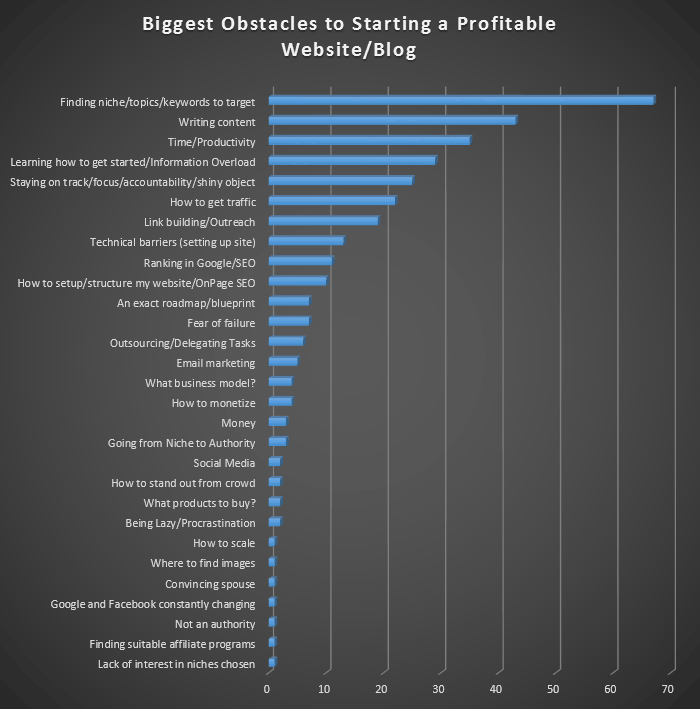
obstacles-poll
You can see that by far the most common problem that people have is finding the right niche and doing keyword research for their sites.  Close behind is content production problems and time/productivity obstacles.
Just in case anyone is curious to see the raw data, here it is:
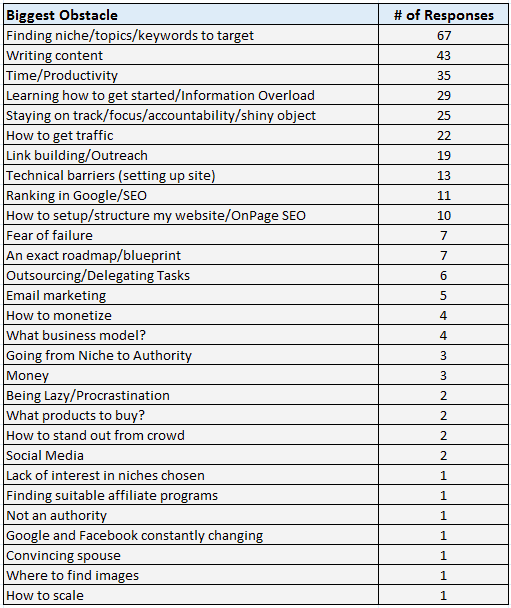
data-obstaclespoll
Now that you have seen all the data, I want to provide my own thoughts on some of these obstacles that many of you are having.

Finding a Niche / Keyword Research

I’ve talked a lot about keyword research in the past, but apparently not enough!  The most common problem that people have when trying to start up a new website is finding the right keywords to target.
Because everyone answered in their own words, some framed the problem as finding a topic for a website, while others specifically have issues finding low competition keywords that they can rank easily for in Google.  In reality, these are all basically the same problem.
The issue is complex, I don’t have a quick fix because everyone might have a slightly different variation to this problem.
All I can say is that for me it’s been practice, practice, practice.  The more you do keyword research and put yourself out there, the more results you see and the more comfortable you get with the entire process.
For those having issues with this obstacle, here’s a few articles that I’ve written in the past:
I’ve written much more on keyword research, and you can find lots of it in this category here.

Writing Content

I was actually surprised to hear how many people were having issues creating content.  These people have found a niche or keyword, but either are unable to produce content themselves or just don’t know where to get content.
I do believe that content is king, and so this is a very valid concern to be thinking about with your new website.  It’s critical that you have valuable content for your readers.
I think people with this content production issue fall into 4 main categories:
  • They KNOW what topics to write about, but they are unsure of how to structure their articles or unsure of how to make it interesting.
  • They CAN write good content, but they don’t have time or are perhaps afraid to put their work out there.
  • They CAN’T write good content and don’t know where to hire people to get good content.
  • The know WHERE to hire content writers, but they don’t have the money to do so.
Again, I wish I had simple solutions to these problems.  At the end of the day, business involves risk.  Oftentimes this includes putting your own content out there for the world to see and investing your own time and money into your website.

Time / Productivity

This is a big one for a lot of people.  I also completely understand.  Like many of you out there, I also had a full-time job and often found myself completely exhausted after work or simply out of time at the end of the day.
For some of you it’s going to be a matter of really prioritizing your tasks and making sure you don’t have any wasted time in your day.
For others, you only think you don’t have any time in your day.  But when you look at how much you play video games or watch TV, you’ll realize that it’s your own fault that you never have time to work on your business.
Yep, that was kinda harsh…but it’s also kinda true for some of you. (You know who you are!).
For me personally, I found while I was working full-time and raising 3 children that the only time I had available to work on my business was from about 9pm to midnight.  I worked at my day job, came home and ate dinner with my family, and then got the kids to bed.
Then from 9pm to midnight was GO TIME!  I also eventually had to start utilizing outsourced workers to help build out sites and other tasks.  But all the hard work paid off big time for me.  After struggling with all of this for a few years, I was able to quit my job on March 11th, 2011 (4 years ago).
I’ve now been full-time in this business ever since and have plenty of time for some of the other things I sacrificed early on.
Again, I don’t have a simple answer for this obstacle other than to say: prioritize as much as possible, and get help/outsource if you can.

Learning How to Get Started / Information Overload

Some people also call this “analysis paralysis”.  Basically, with all the blogs out there, emails to read, and social media to follow; you can sit and “learn” about building a successful websites for YEARS!
I DO have a solution for this one.  Stop.  Just stop the analysis.
Take action and get started.
It really is as simple as that.
You will learn so much more from actually building your first website than you will have learned from reading all the blogs out there.  Pat Flynn actually wrote an article recently on information overload and how he deals with it.
My solution is always to just start taking action.  I did this recently because I’ve been interested in the Amazon FBA business after hearing about Chris Guthrie’s success.
I honestly didn’t have time to read a bunch of blog posts or listen to podcasts or buy products about how to start an Amazon FBA business.  So, instead I just contacted some manufactures in China (via Alibaba.com) about a product I wanted manufactured and got started.
I now expect to have a product up and selling on Amazon possibly by the end of this month (it’s currently under production).
I simply got started.  I’ve honestly read very little about how others run their Amazon FBA business; I’ll learn SO much more from listing and selling my first product than I could have learned in months of die-hard research.

Staying on Track / Focus / Shiny Object Syndrome

How do you overcome shiny object syndrome?  This is a problem that lots of “new” people face because there are so many different options available for starting a business online.
This obstacle is also closely related to the “information overload” problem.  So, part of the solution is to just get started on something.
The other part of the solution is to actually set some goals and stick to those goals. If you find a business model that you want to pursue, WRITE IT DOWN!
Write down your goals and your plans and stick to it.  The best way to accomplish your goals is to tell others about your plans and possibly even form a group that can help you stay accountable to your plans.
Again, this one topic deserves it’s own blog post…or book; but the bottom line is that you need to realize that life is short and that if you keep trying things just a little bit and moving on, you will never accomplish anything great.

How to Get Traffic

I went to the Traffic and Conversion Summit last month and topic of traffic come up oddly enough!  Ryan Deiss of DigitalMarketer.com often stated that people do not have a traffic problem.  I did a quick search and he’s written an article about the fact that you don’t have a traffic problem.
This might shock you but you DO NOT have a traffic problem.
You might have a business model problem, an offer problem or a measurement problem.
But you DO NOT have a traffic problem.
From his perspective, you should be able to BUY traffic (from Facebook, Google, or other places) and as long as you make more money from that traffic than you spent, there is no traffic problem.
I KNOW that we all want free traffic from Google and so it may not have crossed your mind that you can get thousands of visitors to your site tomorrow if you wanted by paying for the traffic.  However, you may not have a way to make enough money on the traffic.
I’m with you though, I’ve always been too stingy to just start spending money on traffic, so I’ve worked like crazy to figure out the “free” traffic solution.
The issue is that this “free” traffic takes time (often many months before you see much traction in Google).  The Google traffic problem usually comes down to targeting the right keywords (that are low competition enough) and producing quality content.

Link Building / Outreach

Getting links is not easy.  I agree that this can be a big stumbling block.  Unfortunately buying “link packages” and using link networks just doesn’t work like they did in the good old days.
So, if you are striving to achieve that wonderful free organic traffic, attracting links is usually a necessary evil.
I’ve covered this topic a few times in the past, including these interviews:

Other Issues

I could try and go through each of these one-by-one to give my opinion on the validity of these road blocks, but that would probably require a short novel.  I’ve covered the top 7 most common obstacles and you can see what the rest are for people trying to create a profitable blog.
I will just say that my favorite issue that someone had is, “convincing spouse”.  My advice is to buy her flowers, let her talk to you (and listen) for as long as she wants, and then snuggle while you let her watch her favorite romantic comedy.  Perhaps then you can bring up your online business ventures :).

Now What?

So, now that you’ve seen me list and discuss some of the biggest obstacles that people face when starting a successful website…where do we go from here?
The problems mentioned are much too in-depth and diverse for me to solve or even respond to effectively in one blog post.  I’ve simply provided some of my own commentary and pointed you to a few resources that might be able to help.
However, just so you know, I’m going to be using the responses to this poll as somewhat of a roadmap for my future blog posts.  Now that I know that people are having the most problems around keyword research and writing content, and a few others, I’ll be focusing my time and effort trying to help people overcome those obstacles.
Overall, this exercise has been extremely valuable to me in understanding the roadblocks of my audience.  I’ve heard from at least 300 of you directly, and knowing how statistics work, I’m certain that MANY more of you are having the exact same issues.
So, I’ll be sharing more of what I’ve learned from creating my own successful websites and blogs and hopefully we can all learn going forward.
I would love to hear any additional comments or questions that you might have.  Do you have any other major stumbling blocks that have not been mentioned already?  Let me know in the comments below.
0

How to Analyze the Top 10 Google Competition for Your Keyword

Understanding how difficult it is to rank in the top 10 of Google for your chosen keyword is probably the most important skill you can acquire when it comes to building niche websites.  Unfortunately, it is also the most difficult skill to learn.  Bar none, picking keywords that are too difficult to rank for are the #1 reason why websites fail.
Most people just do not have the ability to effectively analyze the top 10 results in Google OR do not have the discipline to only go after low competition keywords. Luckily, this skill can be acquired with experience, serious study, and effort.  In my post today, I hope to shed some light on how you can effectively analyze how difficult the top 10 results in Google are for your keyword.
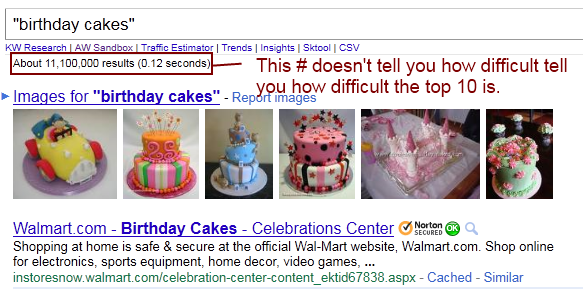
I first want to point out that I am NOT talking about the number of competitors in Google.  For some reason, people still type their keyword into Google and look at the number of competing pages to judge how difficult a keyword is to rank for.  This is ridiculous!  Even if you are looking at “exact match” results – you are still being mislead.  If you are doing this, please stop now – as this will tell you nothing about how hard it is to get where you want to be – which is on the first page of Google.  I don’t care if there are 300 trillion competing websites for my keyword, if the first page of Google is filled with weak websites, I will go after it!
Okay, now that I have that cleared, what exactly am I talking about then?  Well, if you know anything about search engine optimization, you know a thing or 2 about how to rank a website in Google.  So, what we want to look at is how well the top ranking sites are doing these SEO tactics.  Some of these things that websites do to rank well in Google are this: use keyword in article, use keyword in titles, build links to site, build links with keyword as anchor text, and other factors.  So, these are some of the things we need to analyze to determine if the competition is weak.

Ranking Factors to Look At

Here are the criteria that I look at to Analyze the Competition:
  • Relevant Content. Is the keyword in the content?
  • Optimized Title. Is the keyword used in the title?
  • Targeted Content. Is the entire site about your chosen keyword?  Or does the page just happen to mention the keyword?
  • Page Links. How many links are there to the ranking PAGE?
  • Site Links. How many links to the root domain of the site?
  • Authority Links. Are there .edu, .gov, DMOZ, or Yahoo Directory links?
  • Google PageRank. What is the Google PageRank?
  • Root Domain? Is the ranking page a root domain or a subpage?
  • Site Age. What is the site age?
  • Type of site. Is the ranking page a weak type of site like: article directories, forums, Yahoo Answers, other Q&A sites, social sites, or other user generated type sites?
You could certainly go alot deeper and start looking at things like whether or not the ranking pages have links pointing to them that use the keyword in the anchor text, etc – but that gets pretty cumbersome.  And because I like to find ranking pages that have fewer than 10 links or even NO BACKLINKS many times, I don’t worry too much about the anchor text.  This is because I go for very low competition keywords.  If you are looking at more difficult niches, you may need to do more analysis than I discuss here; but most people will do just fine finding low competition keywords using the criteria I have listed above and will discuss further below.

The Importance of Relevant Content

You will notice that the first 3 ranking factors that I mentioned deal with relevant content on the ranking sites.  I stress the importance of determining whether or not a ranking site is actually targeting your keyword or whether they just happen to mention the keyword in passing.  The reason is simple, if a site is ranking for a keyword almost by accident (because they simply mention a keyword in their content) – then you can feel confident that you can outrank them with more targeted content and links.
There really are millions of keywords out there that have sites ranking which may not even be using the keyword in the title of their page.  This is a BIG sign of weakness.  So, even if the site has a high PageRank and has thousands of links to the ranking page, if the site is not really targeting your keyword – you can still outrank them very easily.
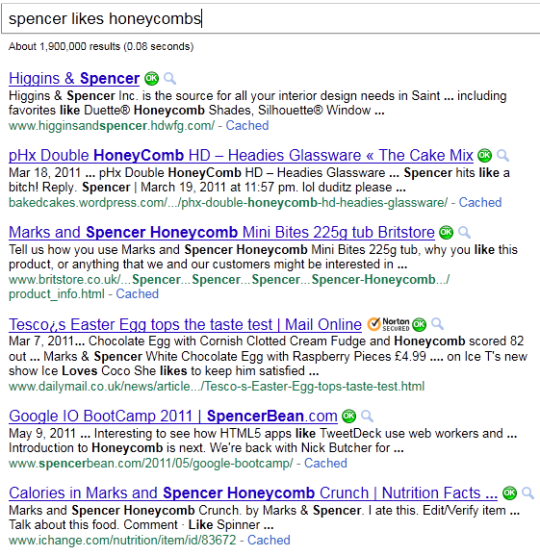
To drive home this point, I am doing a little experiment and by giving you an example.  I typed in a phrase that no one is targeting right now – “Spencer likes Honeycombs” (a true statement by the way).  Below is an image of the sites ranking for this keyword:
You will notice that NONE of the ranking sites are really targeting my keyword (of course not!).  None of them use the exact keyword in the title of their page and only use bits and pieces of it in their content.  So, if this were a keyword I was hoping to rank for, I would immediately get excited because I would know that no one is actually trying to rank for this keyword!  Even if these sites had lots of links or a high PageRank I would still feel confident in my decision (of course its better to target keywords that have weak competitors both in content relevancy and links, etc).  Does that make sense?
So, to make my point even more vivid, I am going to guess that this post will soon rank very high (perhaps #1) for the keyword: Spencer Likes Honeycombs!  The reason?  Simply because I am mentioning the keyword in my article here.  I don’t need any links or anything else – just relevant content.  You can do a Google search and see if I’m right (it may take a day or 2).
So, don’t EVER overlook the importance of relevant content in the article, in the title, and whether or not the entire site is targeting your keywords.  This is why my first 3 points have to do with content.  And YES! you can still find lots of keywords that have weak title competition or content relevancy.
Spencer Likes Honeycombs!

The Importance of Links

The next 3 items I discuss for analyzing the top 10 competitors in Google is links.  I look for less than 10 links to the page if possible (I look at the Yahoo Page Links).  Links to the page are MUCH more important than links to the root domain.  Each page of a site ranks individually, so the page links give you a better indication of how strong the ranking page is.
If the competitors in Google have relevant Titles/content and have lots of links to their pages then you shouldn’t be targeting the keyword.  You can determine on your own how many links is too many for you, but I like to find results with 10 or less links to the page.  Again, I don’t stress out about how many links are to the root domain, unless the resulting page happens to be the root domain.  In that case, a root domain that is optimized for your keyword and has lots of links built to it – is exactly what you want to avoid!  You will typically want to stay away from these keywords.
Most of the time you don’t need to worry about .edu, .gov, or DMOZ, or Yahoo Directory links.  I will typically look at these just to make sure the ranking page doesn’t have any.  Most of the time these type of links only become a factor when you are targeting higher competition keywords or looking at beating root domains.  So, if you see ranking pages that do indeed target your keyword with relevant titles and content, and they have lots of .edu or these other authority type links, you should probably just move onto something less competitive.

Google PageRank

I won’t go into great detail about what Google PageRank (PR) is other than to say its a number assigned by Google from 0 to 10 that shows how much authority a page has.  Pages or sites can also sometimes have a dash (-) which simply means there is no page rank assigned (this is a good sign for you!).  I like to see ranking sites with a PageRank of 0 or – if they are targeting my keyword.
However, if they are not really targeting my keyword well (like in my “spencer likes honeycombs” example), then the PageRank really doesn’t matter.  So, don’t get too hung up with PageRank – unless its obvious that the ranking page REALLY is targeting your keyword.  If so, remember that lower pagerank is better for you.  You can certainly still outrank sites with a Pagerank of 3 or 4, but for the low hanging fruit you should really focus on the PR of 0 sites.

Other Ranking Factors

Root Domain or Subpage?
If the top 10 competitors of a keyword are all root domains, I would probably avoid this.  This usually means that their entire site is targeted and optimized for your chosen keyword.  However, if all the ranking pages are something like: domain.com/subpage1/subpage78/directory/rankingpage.html – this is what you want to see.  The long URL is a good sign for you when looking at the top 10 competitors.
Site Age
Older sites tend to have more authority.  I usually only worry about site age if I am targeting a more difficult keyword and need to do some more in depth analysis of the difficulty of ranking for a keyword.
Type of Site
As mentioned in my original list above, I like to see certain weak types of sites like article directories, forums, Yahoo Answers, other Q&A sites, social sites, or other user generated type sites.  The reason for this is that these types of sites are usually not very good at targeting a specific keyword.  Article directories might mention the keyword in their title, but they usually don’t have any backlinks to the ranking page.  Some of these other types of sites usually just happen to mention the keyword somewhere in the content, but don’t have an optimized page or any relevant links.  Hope that makes sense why these are types of listing you WANT to see in the top 10 (easy to outrank).

Some General Guidelines I Follow

These factors that I have discussed can be a lot to swallow at first.  But I wanted to give you a quick list of some general rules that I use to decide whether or not to target a keyword.
  • Target keywords where not all the results are using the exact keyword in the title.
  • At least 2 of the top 10 results have less than 10 links to the resulting page (0 links preferred)
  • At least 2 of the results with less than 10 backlinks also have a PageRank of 0.  Meaning 2 results need to have a PR of zero AND have less than 10 links.
  • Target results with weak types of sites (article directories, forums, etc.).
  • Target results where ranking pages are NOT root domains.
So, if you can find a keyword where the competitors don’t really use the keyword well in the title, 2 results have 0 backlinks to the Page AND have a PageRank of zero – then you are MONEY!  Yes, this is an ideal and can be very difficult to find – but it is possible.  I always look for the ideal, but often settle for something with just a little more competition if I need to.  I can tell you that my highest earning sites met the 5 bullet points that I mentioned above.  So, its very possible to find keywords that meet this strict criteria.  And if you are patient in doing your keyword research and find these really low competition keywords – you significantly increase your chances of making good money with niche websites.

Tools to Help You Get the Data

I have discussed the factors that you need to look at, but where can you get the data?  Well, luckily there are lots of tools to help you quickly and easily get this data.  Here is a list of 4 tools that I am familiar with:
All in all, I have provided you with everything you need to know to determine if the keyword you are looking at has low competition in the top 10 of Google.  Yes, it takes lots of analysis and know how.  That’s why only the diligent succeed with niche websites or search engine optimization, there is no shortcut.

Your Thoughts!

I have been as detailed as possible in this post, and it may be my longest to date.  I am very interested in hearing your thoughts on this subject.  Are there other factors that you look at to judge the Google competition?  What comments or other questions do you have in regards to this subject?
0

How to Write SEO Friendly Post Title For More Blog Traffic?

Higher search engine ranking not only depends upon your Blog theme, but also in the title of your blog posts. If you have a blog of more than 100+ articles, some articles of your blog may be popular, and some of them may not be a popular one.
Have you ever thought why only a few articles are popular in your blog? Because with or without, knowledge, you might’ve kept a search engine friendly post title for those articles. We have already talked aboutKeyword research using AdWord tool and On page SEO.
One thumb of rule is; your Keyword should be in the post title and most of the writers make a mistake by just adding Keywords and not taking care of optimizing it for betterCTR.
Having Keyword in your post title helps a lot, but when it comes to increasing the CTR, your over all post title makes a huge difference.
Ex:
  • Make your Blog SEO Friendly  (Average title)
  • The Only Guide you need to make your Blog SEO Friendly (Title that will get you more CTR)
As I said SEO friendly titles are important for better search engine rankings, it also must that your article must be attractive, otherwise…… You know what happens, no one opens your blog’s link from the search engine, and no one clicks your post’s title in the homepage to read.
In this article, I’m going to share you “How to write the search engine friendly title that will not only give you more organic traffic but will also improve the CTR.
The Example title, I’ve shared here is “How to get more blog traffic”. In the following I’ll be making this title as a Search engine friendly title.

Steps to Write SEO Friendly Title

If you are new to SEO, I again repeat myself by saying your Keyword should be part of your Post title. You may refer to the Harsh guide on how to write different post title for readers and Search engine. One tip that I would like to give here, Always Write your post title after completing the post.
Step 1) Analyzing the Keyword of the article
Analyzing the keyword is the first step to making your post’s title SEO friendly. There are many keyword analyzer tools available online, such as, Google’s Keyword analyzer tool. Let me explain how I analyze my article’s keyword searches in Google. I’m going to write an article, namely “How to get more blog traffic”.
I first Open Google Adword Keyword tool, and I check the competitions, No. of searches…Etc… Of my article’s main keyword. After Analyzing, I found that their more searches in the keyword “Generate blog traffic” and there is low competition. Now I’ve found the main keyword that I have to insert in my title. If you are one of those who likes Long tail keywords, I recommend you to try SEMRUSH as this tool helps you to find long tail Keywords based on your seed word.
Step 2) Inserting the main keywords to your title
Now I’ve found the keyword, that I should insert it into my post title. First I said that, I’m going to keep my title as “How to get more blog traffic”, after I inserted the main keyword in the Post’s title and after I had made some changes in the title, I made it as
“Traffic Generation Tips to boost your blog’s traffic.”
The title that I’ve made is search engine friendly and attractive too, this kind of attractive titles makes the people eager to open your article and read it.
80% of the part is over. Then what about remaining 20%? , you can find it on step 3!
Step 3) Adding Numbers: The Finishing Touch!
Congrats to me! Because 80% of the part on making SEO friendly post title is over! Now it’s the time to add finishing touch to the article’s title! The next 20% is adding some numbers or Prefix-suffix, to your title to further improve CTR.  I’ve written seven ways for getting more blog traffic in that article. As I’ve written seven tips for increasing blog’s traffic, I should mention “7” on the Post title. So I made it as
“7 Awesome Traffic Generation Tips to boost your blog’s traffic.”
Wow! Now I’ve made a search engine friendly title for my blog post, and that too attractive!
Bonus Tip:
It doesn’t matter what number of the title you use, but make sure your Permalink is clean. So instead of having a permalink like
domain.com/7-awesome-traffic-generation-tips-to-boost-your-blog-traffic.html
It’s better to have
ly myself, you can also make your search engine friendly title for your upcoming blog posts, by following those three ways that I’ve shared above. And I hope you’ll do it! I hope you will make most out of it, and if you wish to add any additional tip here, your suggestions are more than welcome.
If you enjoyed reading this article, do share it on Facebook and Twitter.
0

10 tips for an awesome and SEO-friendly blog post

Writing a blog post -like all other writing- is a skill. In order to keep your reader interested, you should think about structuring your text and writing in an appealing style. You should help your readers to grasp the main idea of your post by providing headings, subheadings and clear paragraphs. If people understand and like your text, they are much more likely to share, like, tweet and link to your post. And that will increase your rankings! So, in order to improve your ranking in Google, you should definitely try to maximize your writing skills!
For some, writing for SEO purposes and writing to attract and keep attracting your audience could appear as two contradictory goals. I totally disagree with this. Indeed, if you not only want a good but also an SEO-friendly blog post, your text should be written in such a way that the words you want to be found for have a very prominent place. And, using your keywords too often severely damages the readability of your text. So, you definitely shouldn’t do that!
In this post, I would like to give some tips on writing blog posts that are both very readable as well as SEO-friendly. I genuinely think those two goals should (and easily can!) go hand in hand.

Elementary writing tips for good blog posts

Before anything, your blog post just has to be a good piece of writing! A lot of bloggers just begin to write when creating a new blog post. They just type what comes to mind. For some, this may be sufficient, because they are natural writing talents. Others may need some help. I always follow the next set of ‘rules’ myself.

1. Think before you write!

Think hard about the message of your text. What do you want to tell your readers? And what is the purpose of your text? What do you want you readers to do at the end of the page? Write down the answers to these questions before you begin writing.

2. Write down the structure of your blog post.

Start your post with creating a clear structure. Every post should have some sort of introduction (in which you introduce your topic), a body (in which the main message is written) and a conclusion (which should summarize the most important ideas or deduce some new idea). Write down what you want to write in all these three sections. You now have a kind of summary of your post. The real writing can begin!

3. Use paragraphs.

Everybody uses paragraphs, but make sure to use paragraphs that make sense. Do not start a new sentence on a new line, just because it looks nice. There should be a reason for making a new paragraph. Every paragraph should have a main idea or a main subject. Ask yourself what the main idea of each paragraph is. You should be able to grasp that main idea in only one sentence. If you need more sentences, you simply need more paragraphs!

4. Use headings.

Headings structure the entire page, so you should make sure to use headings. They are important for readability, but for SEO as well. Headings help Google to grasp the main topics of a long post and thus can help in your ranking. If you want people to find their way in your articles, you should use subheadings. Subheadings will lead people, help them scan your page, and make the structure of your articles that much clearer. Make sure that your keywords are used in the subheadings, but do not put your keyword in every subheading (as it will make the text unreadable).

5. Use signal words.

Signal words help people to scan through your text and help people to grasp the main idea. If you, for instance, have three reasons for wanting to sell a product, you should use signal words as: First of all, Secondly and Finally. Also, words as Nevertheless, Surely and Indeed also give a clear signal to your readers. Readers will instantly get that a conclusion will follow after words as Consequently, So or For this reason. Signal words are thus very important to structure your text.

6. Let other people read your post.

Before publishing your post, let someone else read your post first. Ask him/her whether or not he understands the main idea of your post. Correct typo’s and sentences that are not formulated correctly.

7. Optimize the length of your article.

Make sure your articles have a minimum of 300 words. Google likes long articles, if your article is too long though it might scare away users. So try to stop at around 700 words. And, as a general rule of thumb: try to put your search terms in about 1 to 2 percent of your text. So in an article of 300 words, you should mention your search terms 3 to 6 times.

8. Link to previous content.

If you already wrote some content about the topic of your current post, don’t forget to link to these posts. It will make your post stronger because you show some authority on the subject. Next to that, your link-structure is also of importance for your ranking in Google. You should read Joost his post about cornerstone articles if you want to read more about this.

9. Add content regularly.

Adding actual and functional information to your website will give Google the idea that your website is alive. If it’s not an active website, Google will crawl it less often and it might become less appealing to Google to include the page in the search results.

10. Use our Yoast SEO plugin.

Our Yoast SEO plugin actually helps you write an SEO-friendly blog post. If you want the help of our plugin you should start by choosing your focus keyword and entering it in the appropriate box. This is the most important search term you want people to find this particular page for. Our plugin actually measures many aspects of the text you are writing and helps with making your blog post SEO-friendly. We will describe the most important ones:
  • The plugin allows you to formulate a meta description. This description has to be a short text which indicates the main topic of the page. If the meta description contains the search term people use, the exact text will be shown by Google underneath your URL in the search results.
  • The plugin analyzes the text you write. It calculates a Flesch reading ease score, which indicates the readability of your article. The Flesch reading ease score for example takes into account the length of sentences.
  • The plugin does a pretty big number of checks. It checks whether or not you used your keyword in 5 important locations: the article-heading, the title of the page, the URL of the page, the content of the article and the meta-description. The plugin also checks the presence of links in your article and the presence of images in the article. It calculates the number of words and the density of usage of the focus keyword in the article. Above that, the plugin also checks whether or not other pages on your website use the same focus keyword, to prevent you from competing with yourself.
If you write a relatively SEO-friendly blog post (based on the aspects mentioned before) the plugin will indicate this with a green bullet. Writing pages with green bullets will help you improve the ranking of the pages on your website.
Note that not every dot has to be green for the overall score to be “good”. For instance, these are the results of this post, which does have a “Good” score:
content analysis Yoast SEO example
If you’re not on WordPress, we also have this Page Analysis tool available on our site. It’s still in beta, so we’d love your feedback!
Looking for more optimization? Check out our Yoast SEO Premium plugin!

Conclusion

The era in which some SEO tricks were sufficient to get your website to rank high in Google has long ended. Nowadays, good content has the highest likelihood to result in a higher positions in Google. And good content also leads to more Facebook likes and shares, tweets and return visitors to your website. Of course, you can do some extra things to maximize the SEO friendliness of your post, but most important is: just write a very, very good post!
0

TEMPLATE

sMagazine

live demo
Features:
Instructions:Template Settings / How to install a Blogger template
  • To edit the slider you need to changes the images and urls directly in your template code.
  • To edit the social icons links you need to search and changes the urls directly in your template code.
Template author:PBTemplates
Designer:
Description:
NewsMagazine is a free blogger template adapted from WordPress with 3 columns, left and right sidebars, footer columns, slideshow, social bookmarking icons, posts thumbnails, tabs, drop down menu and neutral colors.
Excellent layout for blogs about any general topic, business or news.
Download NewsMagazine for free in BTemplates.
0